
Two-way radios are built to work hard but even the most rugged device will perform better and last longer with a little routine care.
Whether you are running a fleet of handsets on a construction site or a handful of radios at an event, the same basic principles apply. This guide covers everyday handling, battery care, cleaning, and storage to help you get the most from your radio investment.
Everyday Handling
How a radio is handled day-to-day has a bigger impact on its lifespan than most people realise. A few straightforward habits will prevent the most common types of damage:
- Carry the radio by its body, not its antenna
Repeatedly gripping or swinging a radio by the antenna weakens the connection point and degrades transmission quality over time. - Only use approved accessories
Batteries, earpieces, and chargers should be designed for your specific radio model. Incompatible accessories can cause charging failures, audio problems, or internal damage. - Turn the radio off before connecting accessories
Plugging in or removing accessories while the radio is on can cause minor electrical events that shorten component life. - Check the antenna regularly
The antenna insulation should be intact. Exposed metal on the antenna can cause an RF burn when you press PTT. If the insulation is damaged, the antenna should be replaced. - Avoid exposing radios to extremes
Unless your radio is rated for it – as ATEX radios are for hazardous atmospheres – keep it away from extreme heat, cold, and prolonged moisture exposure.
If a radio is dropped or takes a knock, inspect it before returning it to service. Even hairline cracks in the casing can allow moisture or dust to reach internal components.
Battery Care
The battery is the most maintenance-sensitive part of any radio. Poor charging habits are one of the most common causes of reduced performance and most of them are easy to avoid.
Charging
- Charge batteries fully before returning radios to service
A fully charged battery ensures the radio is ready for a complete shift. - Do not use the charger as a radio stand
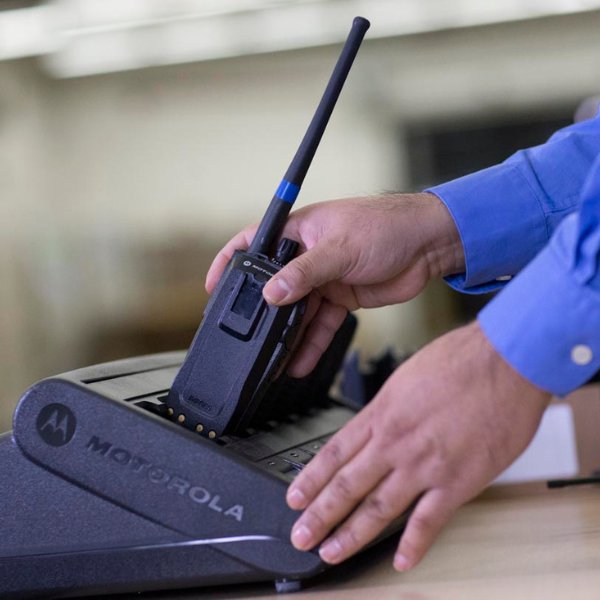
Do not leave a fully charged battery in the charger when not actively charging. Modern approved chargers cut off current when the battery is full, but keeping the radio docked in the cradle indefinitely still subjects the battery to repeated micro top-up cycles that shorten its lifespan. Remove radios from the charger once the indicator shows full, or rotate to a spare. - Keep charging contacts clean
Dirty contacts on either the battery or the charger cradle can prevent the battery from being detected or charging correctly. Wipe them with a dry microfibre cloth regularly. - Use the correct charger for your radio model
Mismatched chargers can damage the battery and may not charge it to the correct voltage. - Turn the radio off while charging to optimise charge time
Battery Lifespan
Lithium-ion batteries in professional two-way radios are typically rated for 300–500 charge cycles. For a radio on daily charge cycles, that translates to roughly 18 months to three years of regular use, depending on duty cycle, temperature, and charging habits. Signs that a battery needs replacing include:
- The radio no longer lasts a full shift on a charge
- The battery feels warm or swollen
- The charge indicator drops quickly after a full charge
When receiving a brand-new battery, it may need a full overnight charge before first use to initialise fully. If a battery has been in storage for more than two months, run a complete discharge and recharge cycle before putting it back into service.
Cleaning Your Radio
Regular cleaning prevents dirt, moisture, and grime from affecting performance and longevity. Motorola Solutions publishes specific guidelines for cleaning its radios and the approach differs depending on whether you are removing dirt or disinfecting the device.
Always turn the radio off before cleaning.
General cleaning (dirt and grime)
- Apply a 0.5% detergent-water solution to a cloth and use a stiff, non-metallic, short-bristled brush to work loose dirt away from the device paying attention to buttons, grilles, and crevices.
- Wipe away the solution with a soft, lint-free cloth and dry the device thoroughly. Ensure no solution remains trapped near connectors, cracks, or crevices.
- For lighter dust and surface grime, a damp microfibre cloth alone is sufficient.
Disinfecting
- Motorola approves wiping devices down with isopropyl alcohol (IPA) at 70% concentration or above for disinfecting purposes. Apply the IPA to a cloth first – never directly to the device.
- Do not use bleach, solvent-based cleaners, or cleaning sprays. These can degrade plastics, damage seals, and affect metal platings.
Battery contacts
- For battery contacts specifically, use IPA at 90% concentration or above, applied sparingly with a cotton swab. Higher-concentration IPA evaporates faster, leaving less moisture residue on electrical contacts. The 70% IPA approved for surface disinfection contains more water, which is intentional for killing pathogens but less suitable for use directly on contacts.
- Wipe charger contacts with a clean dry cloth regularly. Dirty charger cradle contacts are a common cause of batteries failing to charge correctly.
Storing Your Radios
Proper storage matters whether radios are being put away overnight or set aside for several months. The basics apply in both cases:
- Store in a clean, dry, cool place, away from direct sunlight and temperature extremes.
- Remove the battery before long-term storage. Most modern radios have a soft power switch that draws a small continuous current even when switched off. Leaving the battery in place will drain it over time and can cause internal corrosion if the battery begins to deteriorate.
- Store batteries at a partial charge rather than fully charged or fully depleted. This preserves the battery chemistry during periods of inactivity.
- Do not store batteries with metal objects. Keys, coins, and other conductive items can short the battery contacts.
- If radios are stored for six months or more, top up the battery charge mid-way through to prevent deep discharge.
Routine Inspection
A quick inspection before and after each shift catches problems early, before they become failures at the wrong moment. Check for:
- Cracks, dents, or damage to the casing. Even small gaps can allow moisture ingress
- The antenna. Check it is firmly seated and that the insulation is undamaged
- The PTT button and other controls. Confirm they operate smoothly and are not sticking
- Audio quality. Transmit a short test call to confirm the microphone and speaker are clear
- Battery level. Confirm the radio has sufficient charge for the upcoming shift
For fleet operators, keeping a simple log of any radios taken out of service for inspection or repair helps identify recurring problems and informs decisions about when to replace specific units.
Frequently Asked Questions
How often should I clean my two-way radio?
A light wipe-down after each shift is good practice in dirty or outdoor environments. For most office or retail deployments, a thorough clean once a week is usually sufficient.
How long should a two-way radio battery last?
Most lithium-ion batteries in professional radios are rated for 300–500 charge cycles, which translates to roughly 18 months to three years of regular use on daily charge cycles
Can I use any charger with my two-way radio?
No. Always use a charger approved for your specific radio model. Using an incompatible charger can prevent the battery from charging correctly and may cause damage to the battery or the radio.
My radio’s battery runs out faster than it used to — what should I do?
Reduced battery life is usually a sign that the battery is nearing the end of its useful life. Try a full discharge and recharge cycle first. If that does not improve matters, the battery should be replaced.
My radio is IP-rated — do I still need to worry about moisture?
IP ratings define the level of protection against dust and water ingress under test conditions. Seals can degrade over time, especially on older devices or those with cracked casings. Even with a high IP rating, it is good practice to dry the radio after exposure to rain or splashing and to inspect the casing regularly for any signs of damage that could compromise it.
How should I store batteries for the long term?
Store batteries at around 40–60% charge in a cool, dry place (15–25°C, 30–60% humidity). Avoid storing them fully charged or completely flat, as both conditions accelerate cell degradation. If stored for more than six months, top up the charge to around 50% before returning the batteries to storage.
Is it safe to leave a radio on the charger overnight?
Modern approved chargers cut off current automatically when the battery reaches full charge, so they do not continuously force power into a full battery. However, Motorola’s own guidance is explicit: do not leave a fully charged battery in the charger when not charging, and do not use the charger as a radio stand. Keeping radios permanently docked subjects batteries to repeated micro top-up cycles as voltage slowly drops, which degrades cells over time. Where possible, remove radios from the charger once full. If your operation requires radios to be cradle-mounted for readiness, check whether your charger model has a conditioning or maintenance mode designed for that purpose.
Can I clean my radio with alcohol wipes?
Motorola’s guidelines approve isopropyl alcohol (IPA) at 70% concentration or above for disinfecting radio surfaces – applied to a cloth first, never directly to the device. For battery contacts specifically, 90%+ IPA is preferable because it evaporates faster and leaves less moisture on electrical connections. For general dirt and grime, Motorola recommends a 0.5% detergent-water solution with a non-metallic brush, followed by a thorough dry. Never use bleach, solvents, or cleaning sprays.
Should I remove the battery when the radio is not in use?
For overnight or short-term periods, it is not essential as most radios in regular service are left with the battery installed. However, for radios being stored for more than a few weeks, removing the battery is recommended. It prevents the radio’s standby circuitry from slowly draining the battery and reduces the risk of corrosion if the battery develops a fault.
What should I do if my radio is dropped or damaged?
Inspect the casing for cracks or deformation before continuing to use the radio. Even a small crack can allow moisture to reach internal components. Check that the antenna is still firmly attached and the controls operate normally. If there is visible damage or the radio is not performing as expected, take it out of service for a professional inspection rather than continuing to use it.
Need Support With Your Radio Fleet?
Good day-to-day maintenance goes a long way but when a radio does need professional attention, 2CL’s repair and maintenance service can help.
We carry out repairs on all major brands, even if the equipment was not originally purchased from us, and our team can advise on battery replacement schedules, accessory compatibility, and fleet management for organisations of any size.
With over 50 years of experience supporting radio fleets across events, facilities management, construction, and more, we are well placed to help you keep your communications running reliably.
Find out more about our repair and maintenance service, or contact us.